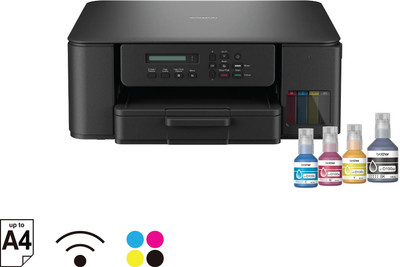
DCP-T530DW Experience Seamless Printing with Auto Duplex and WiFi Support Multi-function WiFi Color Ink Tank Printer(4 Ink Bottles Included)
18 / 34 facts
16 facts missing. Know one? Add itFacts
Identity & launch
- Model year
- not recorded yet
- Model number
The maker's exact model code. Printer families share marketing names across very different machines, and the cartridge that fits depends on this code, not the family name.
- DCP-T530DW
Printing
- Print technology
How the machine puts marks on paper, which drives almost everything else about it. Ink tank models refill from bottles and cost the least per page in India; laser is fastest for plain text and does not dry out when idle; cartridge inkjets are cheapest to buy and dearest to run.
- Inkjet
- Sprays liquid ink from replaceable cartridges. Cheap to buy, expensive per page, and the head can clog if unused for weeks.
- Ink tank
- Refillable reservoirs filled from bottles. Higher purchase cost, far lower cost per page.
- Laser
- Fuses toner powder with heat. Fast, sharp text, no drying out, but colour models are expensive.
- LED
- Works like laser with an LED array instead of a laser. Similar results, often a more compact body.
- Thermal
- Uses heat-sensitive paper or ribbon. Common for receipts and labels; plain thermal print fades over time.
- Dot matrix
- Strikes an inked ribbon through a pin head. Slow and noisy, but the only common way to print carbon-copy multi-part forms.
- Dye-sublimation
- Transfers dye with heat for continuous-tone photos. Used for dedicated photo printers.
- Ink tank
- Colour printing
Whether the machine prints in colour or black only. A monochrome laser is markedly cheaper to buy and to run when colour is never needed.
- Colour
- Functions
What the machine does besides print. An all-in-one saves desk space, but a failed print head takes the scanner out of service with it.
- Print, scan, copy
- Two-sided printing
Whether the machine prints both sides on its own. Manual duplex only means it prompts you to flip the stack, which saves paper but no time.
- Automatic
- Print resolution
Dots per inch, such as 1200 x 1200. Above roughly 600 dpi the difference is hard to see on plain text, and it matters mainly for photos and fine line art.
- 1200 x 6000
- Borderless printing
Whether the machine can print to the edge of the sheet without a white margin, which matters for photos.
- not recorded yet
Speed & volume
- Speed, black
Pages per minute in black, measured to the ISO test standard. It excludes the wait for the first page, so a short job feels slower than this number suggests.
- not recorded yet
- Speed, colour
Pages per minute in colour, to the same ISO standard. Inkjets typically drop much further from their black figure than lasers do.
- not recorded yet
- First page out
How long from idle to the first printed sheet. Lasers must warm up; this is what you actually wait for when printing a single page, and it is often the more honest speed figure.
- not recorded yet
- Monthly duty cycle
The maximum pages the machine can survive in a month, not a recommendation. Makers also publish a recommended monthly volume that is a fraction of this; running near the duty cycle shortens the machine's life.
- not recorded yet
- Recommended monthly volume
The print volume the maker actually designed the machine for. This is the realistic figure to match against your own usage, unlike the duty cycle.
- not recorded yet
Paper handling
- Paper sizes
- A4, A5, A6, Letter, Legal
- Input tray capacity
How many sheets the main tray holds. A 100-sheet tray needs refilling roughly every half ream, which becomes a chore in a busy office.
- not recorded yet
- Output tray capacity
How many printed sheets stack before they need clearing. A small output tray can jam on long unattended jobs.
- 50 sheets
- Automatic document feeder
Whether the scanner can pull in a stack of pages by itself instead of one sheet at a time on the glass. Essential for scanning multi-page documents.
- No
- Feeder capacity
How many sheets the document feeder takes at once.
- not recorded yet
- Two-sided scanning
Whether the feeder can scan both sides without you turning the stack over. Single-pass models do it in one go; others run the stack through twice.
- not recorded yet
- Media types
What the machine can print on besides plain paper, such as envelopes, labels, card or photo paper. Heavier media needs a straight paper path, which not every model has.
- Glossy, Plain, Recycled
Connectivity
- Connectivity
How the machine accepts jobs. Wi-Fi Direct lets a phone print without joining your network, which is a separate feature from ordinary Wi-Fi.
- Wi-Fi
- Scan to network
Whether scans can go straight to email, a shared folder or cloud storage rather than only to a directly connected computer.
- not recorded yet
Ink, toner & running cost
- Cartridge or bottle model
The exact supply codes this machine takes. It is the single most useful fact in the category and almost never on the product listing: supply availability and cost decide the real cost of owning the printer.
- not recorded yet
- Page yield
How many pages one cartridge or bottle set prints, to the ISO standard at 5% coverage. Real documents with images use far more, so treat it as a comparison figure between models rather than a promise.
- not recorded yet
- Starter supply yield
How many pages the supplies included in the box will print. Bundled starter cartridges are often a fraction of a full one, so the first replacement comes sooner than expected.
- not recorded yet
- Separate colour cartridges
Whether each colour is its own cartridge. With a combined tri-colour unit, running out of one colour means replacing all three.
- not recorded yet
- Works without chipped supplies
Whether the machine accepts refills or third-party supplies without a chip check. Chipped models can refuse cheaper alternatives or after-market refills entirely.
- not recorded yet
Body & power
- Weight
- 7200 g
- Dimensions
Width x depth x height in millimetres. Check the depth with the trays extended, which is often much more than the closed figure.
- 390 x 343 x 148.5
- Control panel
What the machine shows you. Without a screen, errors and ink levels are only visible from a connected computer or the phone app.
- Mono LCD
- Power draw, printing
Electricity used while printing. Lasers draw far more than inkjets because they heat the fuser, which can matter on an inverter or a small UPS.
- 2.5 W
- Noise
How loud the machine is while printing, in decibels. Worth checking for a printer that shares a room with a desk, since dot matrix and some lasers are markedly louder.
- 56 dB
Official sources
- Official spec sheet
A link to the maker's own specification page for this exact model. It is the source a disputed fact here should be checked against, and it is where the supply codes are confirmed.
- https://www.brother.in/en/products/all-printers/printers/dcp-t530dw
- Spec sheet version
Which revision of the maker's spec page these facts were read from, as a date or version. Makers quietly edit spec pages after launch, so this records which wording was in front of us.
- 2026-09-06
Record oc_8972b3197749 · Report a wrong fact