R15 Wi-Fi 6 Router 2.4 GHz, 5 GHz 1500 Mbps Wifi Speed Dual Band External Antenna Ethernet (Cable Broadband)(White)
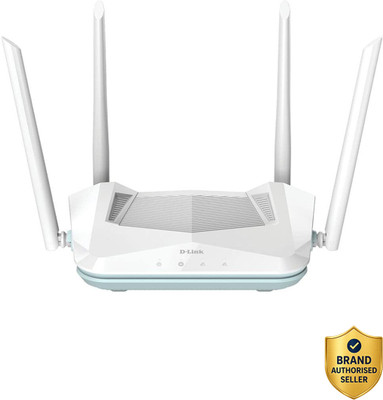
4 / 34 facts
30 facts missing. Know one? Add itFacts
Identity & launch
- Model year
- not recorded yet
- Model number
The maker's exact model code, including any hardware revision such as v2 or v3. Revisions of the same name can differ in chipset and memory, which changes what third-party firmware will run.
- not recorded yet
Wi-Fi
- Wi-Fi generation
The Wi-Fi generation. Both the router and the device must support a generation to use its speed, and an older laptop connects at its own generation no matter what the router supports.
- Wi-Fi 4 (n)
- 2009 generation, 2.4 GHz only in most units. Adequate for browsing, slow for large transfers.
- Wi-Fi 5 (ac)
- Adds the faster, shorter-range 5 GHz band. Still the most common standard in use.
- Wi-Fi 6 (ax)
- Handles many simultaneous devices far better than Wi-Fi 5, which matters more than raw speed in a busy home.
- Wi-Fi 6E
- Wi-Fi 6 plus the 6 GHz band, which is uncongested but has shorter range and needs a 6E client device.
- Wi-Fi 7 (be)
- Adds wider channels and lets a device use several bands at once for lower latency.
- Wi-Fi 6 (ax)
- Bands
How many radio bands the unit runs. 2.4 GHz travels furthest and through walls; 5 GHz and 6 GHz are faster but shorter range. Extra bands mostly help by giving mesh units a private channel to talk to each other.
- Dual band
- Speed class
The maker's combined speed label, such as AX3000. It adds together the theoretical maximums of every band, so no single device ever sees that number; use it to rank models within one brand, not as a real-world speed.
- not recorded yet
- MU-MIMO
Whether the router can talk to several devices at once rather than taking turns rapidly. It helps most in homes with many simultaneous streams.
- not recorded yet
- OFDMA
Whether the router can split a channel among several devices in one transmission. Introduced with Wi-Fi 6, it reduces lag in crowded networks more than it raises peak speed.
- not recorded yet
- Spatial streams
How many independent data streams the radios can send at once. More streams raise the ceiling when devices also support them, which most phones do not beyond two.
- not recorded yet
- WPA3 security
Whether the router supports the current Wi-Fi encryption standard. WPA3 resists offline password guessing in a way WPA2 does not.
- not recorded yet
Ports & wired
- LAN ports
- not recorded yet
- LAN port speed
A Wi-Fi 6 router with 100 Mbps ports cannot deliver a 300 Mbps connection over cable. This is the most common mismatch in the category.
- not recorded yet
- WAN port
The port that connects to your internet line, and its speed ceiling. A gigabit WAN port caps the whole connection at about 940 Mbps no matter how fast the Wi-Fi is.
- not recorded yet
- USB ports
- not recorded yet
- USB version
The speed of the USB ports, used for attached storage or a backup mobile dongle. USB 2.0 is too slow to serve large files from an attached drive at Wi-Fi speeds.
- not recorded yet
- Link aggregation
Whether two wired ports can be combined for more bandwidth to one device, such as a network drive. Both ends must support it.
- not recorded yet
Coverage & mesh
- Mesh capable
Whether the unit can join a mesh network with others of the same family to cover a larger area under one network name, instead of creating a separate one.
- No
- Stated coverage
The floor area the maker claims the unit covers, measured in open space. Indian walls of brick and concrete cut this heavily, so treat it as an upper bound rather than a promise.
- not recorded yet
Hardware
- SIM slot
Whether the unit takes a mobile SIM to provide or back up the connection. Useful where fixed broadband is unreliable.
- No
- Cellular standard
Which mobile generation the built-in modem supports, when the unit has a SIM slot. Check it against the bands your operator uses locally.
- not recorded yet
- Processor cores
How many cores the router's own processor has. It matters for features that inspect traffic, such as parental controls or a VPN, which can otherwise cap your speed well below the line rate.
- not recorded yet
- Memory
The router's working memory. Low memory shows up as slowdowns or reboots when many devices connect at once, rather than as a lower peak speed.
- not recorded yet
- Antennas
- not recorded yet
- Antenna type
Whether the aerials are hidden inside or stick out. Detachable ones can be replaced with higher-gain versions; internal ones look tidier and usually cover slightly less.
- not recorded yet
Features & security
- Built-in VPN server
Whether the router can host a VPN so you can reach your home network from outside. Separate from a VPN client, which routes your traffic out through a provider.
- not recorded yet
- Parental controls
Whether the router can filter or schedule access per device. Some makers charge a subscription for the useful tiers of this after a trial.
- not recorded yet
- Guest network
Whether the router can run a separate network for visitors that cannot reach your own devices.
- not recorded yet
- Subscription for full features
Whether some advertised features stop working after a trial unless you pay a recurring fee. This is a recurring cost that the box rarely mentions clearly.
- not recorded yet
- Automatic firmware updates
Whether the router installs its own security updates. Routers are rarely checked by hand, so automatic updates are the main thing keeping a home network patched.
- not recorded yet
Body
- Weight
- not recorded yet
- Dimensions
Height x width x depth in millimetres. Worth checking against the shelf or cabinet the unit has to sit in, since tall antennas need clearance.
- not recorded yet
- Wall mountable
Whether the unit has fixings to hang on a wall, which usually improves coverage over sitting it low on a shelf.
- not recorded yet
- Power draw
How much electricity the unit uses. A router runs continuously, so this is a small but permanent addition to a monthly bill.
- not recorded yet
Official sources
- Official spec sheet
A link to the maker's own specification page for this exact model and hardware revision. It is the source a disputed fact here should be checked against.
- not recorded yet
- Spec sheet version
Which revision of the maker's spec page these facts were read from, as a date or version. Makers quietly edit spec pages after launch, so this records which wording was in front of us.
- not recorded yet
Record oc_d72c82cde986 · Report a wrong fact